如何创建报告
本文由英文机器翻译。 当前显示英文原文。
The Reports module can completely replace PowerPoint presentations in your standard reporting. All your reported data are in one place and traceable in history.
TeamGuru lets you add live data directly from the system, e.g. metric charts or statistics from your 8D reports.
Create the report
-
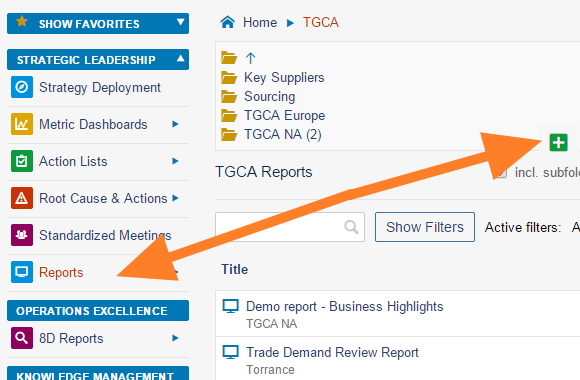
Create a new document. Go to the Reports module and click the Add icon to create a new document.
-
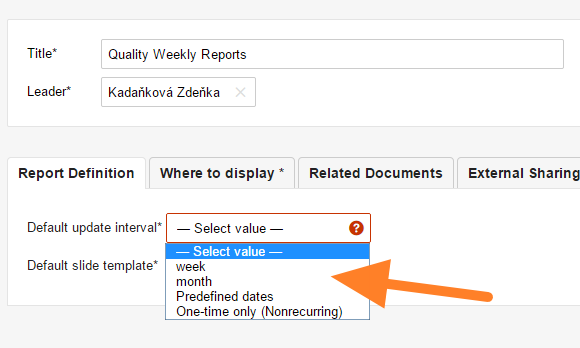
Fill in the basic settings. Enter the report name and the responsible person, and select the Default update interval.
-
Select the slide template. Select the default slide template for your report (see How to create a new report template) and save the document.
-
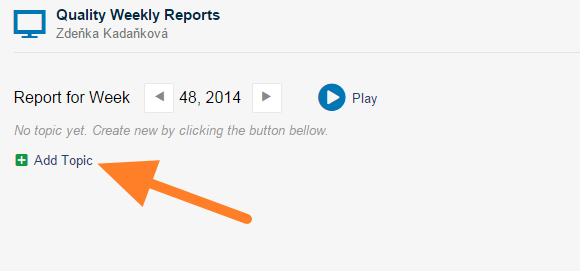
Add a slide. Click the Add Topic button to add a new slide.
-
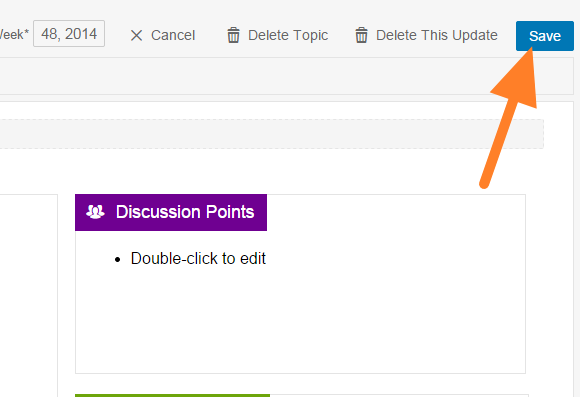
Fill in the report. Fill in your report and save it. Tips: add 8D Reports statistics, add a metric chart, add a picture.
-
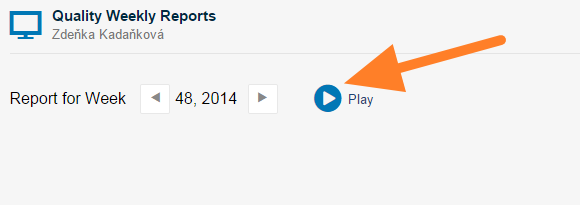
Present the report. Click the Play button to get a full-screen view for your presentation.
You may also be interested in: How to update your report
Video guide
Watch how to create a new report
有了 报告 模块,日常汇报可以完全取代PowerPoint演示文稿。所有汇报数据集中在一处,并可追溯历史记录。
TeamGuru可以直接从系统中添加实时数据,例如指标图表或8D报告的统计数据。
创建报告
-
新建文档。 打开 报告 模块,点击 添加 图标新建文档。
-
填写基本设置。 输入报告名称和负责人,并选择 默认更新间隔。
-
选择幻灯片模板。 为报告选择默认幻灯片模板(参见如何创建报告模板),然后保存文档。
-
添加幻灯片。 点击 添加主题 按钮添加一张新幻灯片。
-
填写报告。 填写报告内容并保存。提示:添加8D报告统计、添加指标图表、添加图片。
-
演示报告。 点击 播放 按钮,以全屏视图进行演示。
您可能还想了解:如何更新报告
视频指南
观看如何创建报告
还需要帮助吗?
请给我们留言。工作日我们通常会在一小时内回复。