如何创建合作伙伴联系人并开通访问权限
本文由英文机器翻译。 当前显示英文原文。
The Partners module helps you manage information about your external partners (customers and suppliers – see How to create a new partner’s card). You can create accounts for your contact people and share your TeamGuru documents and data with them.
Give partners access to 8D Reports
The most common external user right is 8D partner (see how to create a new supplier and their login details), which is used for the 8D Reports module. Your supplier can then access your 8D Report document and update its sections online. Learn more about 8D Reports.
Share other documents
You can share any other document with your partner using the External Sharing function (see how to share a document with an external partner) and a predefined external user role (see user roles).
Please watch our video tutorial How to create a new external partner & share documents and the other tutorials designed for suppliers.
Create a contact person account
-
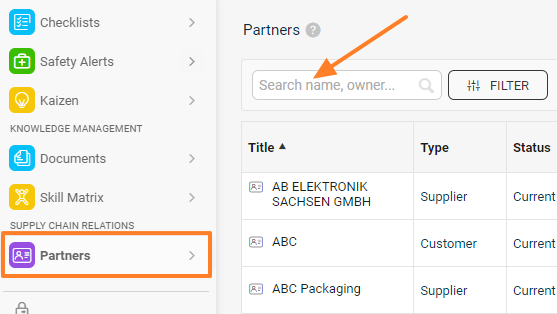
Find the partner. Go to Partners and search for the existing partner.
-
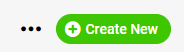
Create the partner if needed. If the partner does not exist in the system yet, create a new partner by clicking the Create New icon in the upper right corner.
-
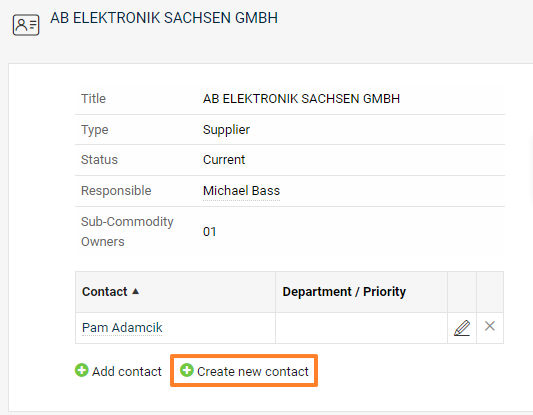
Open the partner’s card. Click the partner’s name to see the details of the partner’s card.
-
Create a new contact. Click Create new contact.
-
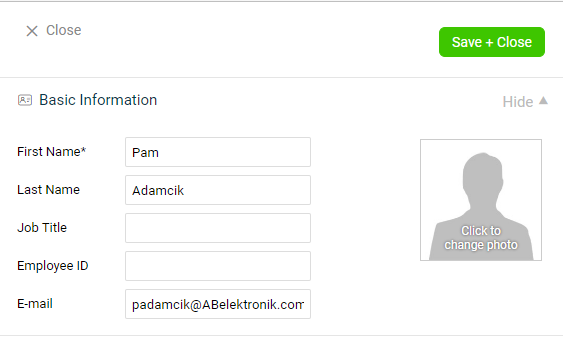
Enter the contact details. Enter the basic contact details: first name, last name and email.
-
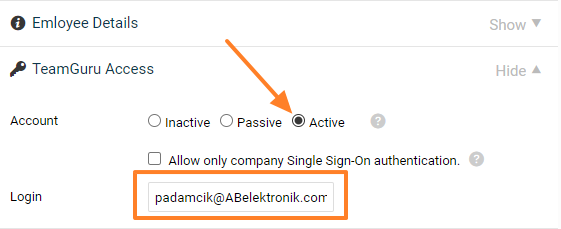
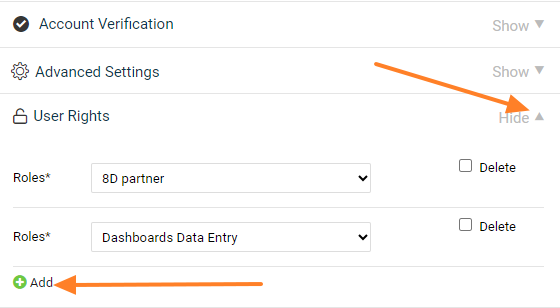
Set up the access. If the contact person needs to access a specific TeamGuru document shared with them, choose the Active account type and set up the Login and User Rights. A role contains a specific list of rights that the person has in the system, e.g. 8D partner.
-
Save the contact. Click the Save + Close button in the upper right corner.
-
The contact sets a password. Your contact person receives an email with a link to set up their password in the system.
使用 合作伙伴 模块,您可以管理外部合作伙伴(客户和供应商,参见如何创建合作伙伴卡片)的信息。您可以为联系人创建账户,与他们共享TeamGuru中的文档和数据。
允许合作伙伴访问8D报告
最常用的外部用户权限是 8D合作伙伴(参见如何创建供应商及其登录信息),用于 8D报告 模块。供应商随后即可访问您的8D报告文档,并在线更新其中的各个部分。详细了解8D报告。
共享其他文档
您可以使用外部共享功能(参见如何与外部合作伙伴共享文档)和预定义的外部用户角色(参见用户角色),与合作伙伴共享其他任何文档。
请观看视频教程如何创建外部合作伙伴并共享文档以及其他专为供应商制作的教程。
创建联系人账户
-
查找合作伙伴。 进入 合作伙伴,搜索现有合作伙伴。
-
按需创建合作伙伴。 如果系统中还没有该合作伙伴,请点击右上角的 新建 图标创建新合作伙伴。
-
打开合作伙伴卡片。 点击合作伙伴名称,查看合作伙伴卡片的详细信息。
-
新建联系人。 点击 新建联系人。
-
输入联系人信息。 输入联系人的基本信息:名字、姓氏和电子邮件。
-
设置访问权限。 如果联系人需要访问与其共享的特定TeamGuru文档,请选择 启用 账户类型,并设置 登录名 和 用户权限。角色包含该人员在系统中拥有的一组特定权限,例如 8D合作伙伴。
-
保存联系人。 点击右上角的 保存并关闭 按钮。
-
联系人设置密码。 联系人会收到一封电子邮件,其中包含设置系统密码的链接。
还需要帮助吗?
请给我们留言。工作日我们通常会在一小时内回复。